Level Up Your GitLab CI: A Guide to Reducing Duplication and Improving Readability
 Ridae Hamdani
- 6 Min To Read
- 02 Dec, 2025
Managing complex CI/CD pipelines can be challenging, especially when your CI configuration contains complex logic and many lines of code. This often leads to high maintenance costs and duplicated code blocks, making updates and troubleshooting more difficult.
In this article, I’ll share practical tips I’ve learned from optimizing our .gitlab-ci.yml to simplify and streamline the process of building multiple Docker images. These strategies aim to make your CI files more readable, reduce duplication, and help you maintain a flexible, efficient CI/CD workflow with less effort.
Whether you’re managing a growing project or looking to improve your CI/CD practices, these insights can elevate your DevOps experience and make your configurations more maintainable.
Use default keyword to set global configuration
Let’s begin with the simplest and most effective tool for reducing boilerplate: the default keyword. If you find yourself copying and pasting the same set of keys into nearly every job, default is your best friend.
Repetitive configuration can be set globally—such as the runner tag, image, or interruptible—and these settings apply to all jobs automatically. For more targeted adjustments, you can override these defaults on a per-job basis.
For example, if you’re using a standard or generic runner for most of your jobs and a different runner for a few, consider defining a global runner tag. This way, you won’t need to set the runner for each job individually; you can override the global tag when needed.
❌ Don’t do:
compile:
  script:
    - ...
  tags:
    - myrunner
test:
  script:
    - ...
  tags:
    - testrunner
deploy:
  script:
    - ...
  tags:
    - myrunner
✅ Do:
default:
  tags:
    - myrunner

compile:
  script:
    - ...

test:
  script:
    - ...
  tags:
    - testrunner
deploy:
  script:
    - ...
Generate Jobs Dynamically with parallel:matrix
GitLab has a powerful CI feature for running a matrix of jobs in parallel. Instead of defining one job per image, you can create a single template job and use a matrix to generate all the variations dynamically. This eliminates almost all job duplication.
From experience, this is a game-changer for scenarios where you need to test against multiple environments, like different JDK versions. We used to have multiple jobs just to ensure that a change didn’t break a standard pipeline:
❌ The old way: one job per JDK version
test-mvn-jdk-11:
  image: openjdk:11-jdk
  stage: test-image
  script:
    - mvn -V compile

test-mvn-jdk-17:
  image: openjdk:17-jdk
  stage: test-image
  script:
    - mvn -V compile

test-mvn-jdk-21:
  image: openjdk:21-jdk
  stage: test-image
  script:
    - mvn -V compile
This approach isn’t scalable. Adding a new JDK image means copying, pasting, and editing another block of code, which is tedious and error-prone.
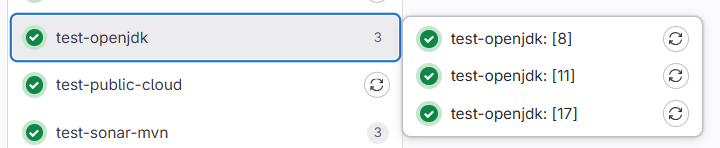
Taking advantage of parallel:matrix saves you multiple lines of code and makes your CI files much more readable and easier to maintain. With it, you define a single, reusable job template, and GitLab CI creates a job for each variable combination you list.
✅ The smart way: one template, many jobs
test-mvn:
  stage: test-image
  image: $JAVA_VERSION # The image is now a variable
  script:
    - mvn -V compile
  parallel:
    matrix:
      - JAVA_VERSION: ["openjdk:11-jdk", "openjdk:17-jdk", "openjdk:21-jdk"]
Use rules to Define Variables Conditionally
While rules are primarily known for deciding if a job should run, they have another powerful capability: defining variables based on specific conditions. This allows you to create a single, smarter, flexibale job that adapts its behavior to its context, such as the branch name or pipeline trigger.
For our repository’s CI/CD workflow, we start by building docker images and test them if there’s a Merge Request.
Only when everything checks out, we create a final version TAG for release.
Using rules reduced our build jobs by a half.
❌ Instead of defining two jobs, for example:
build_for_mr:
  stage: build
  script:
    # Build with a temporary tag for testing
    - docker build -t my-registry/my-app:$CI_COMMIT_SHA .
    - echo "Image built for MR testing."
  rules:
    - if: $CI_PIPELINE_SOURCE == "merge_request_event"

build_for_main:
  stage: build
  script:
    # Build with the final "latest" tag for release
    - docker build -t my-registry/my-app:latest .
    - echo "Final image built for release."
  rules:
    - if: $CI_COMMIT_BRANCH == "main"
✅ Use the same job and override the variables depending on the rules conditions:
build_image:
  stage: build
  script:
    - docker build -t my-registry/my-app:$IMAGE_TAG .
    - echo "Image my-registry/my-app:$IMAGE_TAG built successfully."
  rules:
    - if: $CI_PIPELINE_SOURCE == "merge_request_event"
      variables:
        IMAGE_TAG: $CI_COMMIT_SHA # Use the commit SHA for MRs
    - if: $CI_COMMIT_BRANCH == "main"
      variables:
        IMAGE_TAG: latest # Use 'latest' for the main branch
Reuse Job Logic with extends for Cleaner Templates
If you find yourself repeating the same script, caching, or artifact rules across multiple jobs, GitLab’s extends keyword can drastically simplify your YAML structure. You create a single base template, then extend from it to build specialized jobs.
This keeps your pipeline DRY (Don’t Repeat Yourself) and makes changes far easier — update the base job once, and everything else inherits the improvement.
In our case, we maintain several Docker images, each located in a different folder and following almost the same build logic. Initially, we duplicated the entire block for every image: same stage, same script, same tags… only the build context and image name were different. Each change required updating several jobs — and it was only a matter of time before inconsistencies appeared.
By introducing a shared build template, we eliminated this duplication entirely.
❌ Before — repetitive script and configuration everywhere
build-jdk21:
  stage: build
  script:
    - docker build -t openjdk/21-jdk ./21-jdk
    - docker push openjdk/21-jdk

build-jdk17:
  stage: build
  script:
    - docker build -t openjdk/17-jdk ./17-jdk
    - docker push openjdk/17-jdk

build-jdk11:
  stage: build
  script:
    - docker build -t openjdk/11-jdk ./11-jdk
    - docker push openjdk/11-jdk
.
This worked… but it didn’t scale. Adding a new image to build meant copy + paste + pray you didn’t forget something.
✅ After — one template, many specific jobs
.build-template:
  stage: build
  script:
    - docker build -t $IMAGE_NAME $CONTEXT_DIR
    - docker push $IMAGE_NAME

build-jdk21:
  extends: .build-template
  variables:
    IMAGE_NAME: openjdk/21-jdk
    CONTEXT_DIR: ./21-jdk

build-jdk17:
  extends: .build-template
  variables:
    IMAGE_NAME: openjdk/17-jdk
    CONTEXT_DIR: ./17-jdk

build-jdk11:
  extends: .build-template
  variables:
    IMAGE_NAME: openjdk/11-jdk
    CONTEXT_DIR: ./11-jdk
This approach makes the CI file much easier to read and maintain. New contributors can quickly understand the build strategy without wading through repetitive YAML. For even more efficiency, you can combine extends with parallel:matrix, as explained earlier, to generate multiple jobs from the same template, reducing duplication even further.
Prevent Full Pipeline Execution with workflow:rules
Not every commit deserves a full CI/CD run. Running pipelines for tiny documentation updates, CI-only changes, or tag pushes can waste both time and compute.
Of course, you can rely on adding [ci skip] to your commit message to prevent the pipeline from running, but a more proper and reliable approach is to enforce this rule directly in your CI workflow.
With workflow:rules, you can skip entire pipelines if they don’t meet your criteria. This helps cut down pipeline noise, boosts throughput, and saves runner resources.
✅ Example: Skip pipeline when changes are docs-only
workflow:
  rules:
    - changes:
        - "*.md"
      when: never
    - when: always
This ensures the pipeline only runs when actual application code changes — a big efficiency gain in active repositories.
Conclusion
Reducing duplication in GitLab CI is not just about aesthetics — it’s a real boost for performance, productivity, and maintainability. By applying the techniques discussed in this article, you can transform a large, hard-to-maintain pipeline into a clean, scalable, and developer-friendly CI/CD infrastructure.
Ultimately, a well-structured CI/CD pipeline isn’t just easier to maintain — it empowers your team to ship features faster, with confidence and reliability.